AI Tool Reviews
AI Video Tools for Ecommerce Ads After Sora: Runway, Kling, and Veo Compared
A practical comparison of AI video tools for ecommerce ads after Sora's shutdown, covering Runway, Kling, Veo, ad scenes, retry cost, and workflow fit.
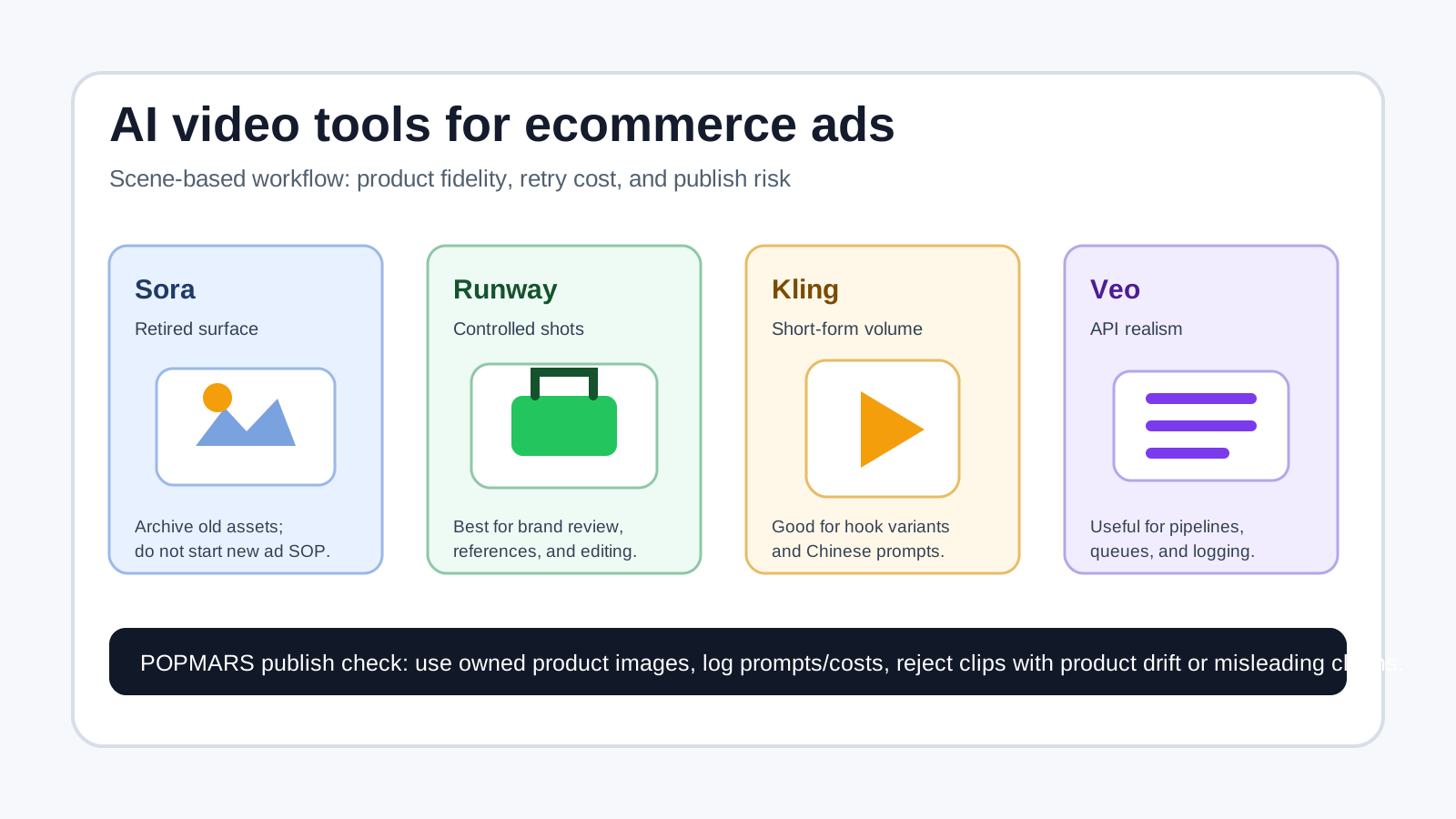
The search query “AI video tools for ecommerce ads” usually hides a practical question: if you have one product image, three selling points, and a vertical ad deadline, which tool will give you usable footage fastest?
As of May 2, 2026, Sora should not be treated as a new ecommerce ad workflow dependency. OpenAI’s Help Center says the Sora web and app experiences were discontinued on April 26, 2026, with the Sora API also on a shutdown timeline. So this guide treats Sora as an asset-archive and platform-risk lesson, not as the next tool to build a new ad SOP around.
This is not a fake “we tested everything” leaderboard. Instead, it is a reproducible buying and testing guide for ecommerce teams. Runway is strongest when you need controllable shots and a post-production workflow. Kling is a strong candidate for high-volume short-form ecommerce variants, especially for Chinese-language and short-video-first teams. Google Veo is worth evaluating if you need realistic video generation through an API and already operate in the Gemini or Google Cloud ecosystem.
Quick verdict: choose by ad scene, not by hype
| Ecommerce ad job | Best first test | Backup | Why |
|---|---|---|---|
| Animate a product hero image | Runway / Kling | Veo | Runway is built for consistency and editing workflows; Kling is fast for short-form variants. |
| Model try-on or lifestyle motion | Kling / Veo | Runway | Kling fits creator-style ecommerce videos; Veo can deliver realism but needs stricter review. |
| 3-second hook + 6-second selling points | Kling | Runway | Volume, retry speed, and cost matter more than cinematic quality. |
| Premium brand concept film | Runway / Veo | Kling | Consistency, camera language, and editing control matter more than the cheapest render. |
| Older Sora assets | Download, archive, migrate | - | Do not build a new delivery process on a discontinued product surface. |
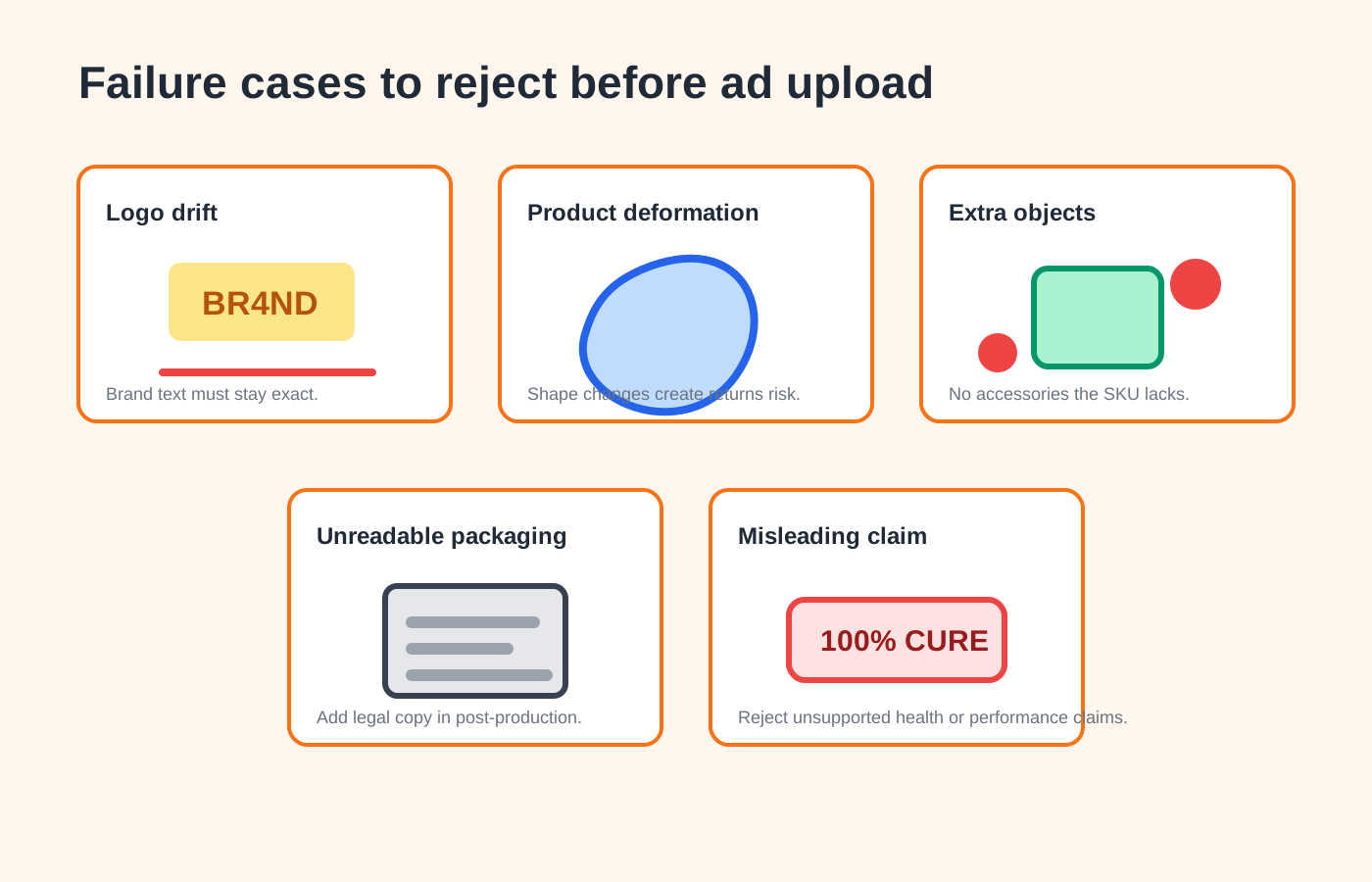
The real ecommerce test is simple: does the first frame still look like the product, does the motion preserve shape and logo placement, how many retries are needed, and can the final clip move into your ad editing workflow?
Product status: Sora is now a risk reminder
Sora: archive first, do not create a new dependency
OpenAI’s Sora 2 announcement emphasized stronger physical realism, controllability, and synchronized audio. Current OpenAI Help Center guidance changes the practical recommendation: ecommerce teams should focus on archiving old assets and avoiding new dependencies on Sora.
For existing Sora work, record:
- generation date;
- model or product surface used;
- prompt and input references;
- export status and rights notes;
- where the clip is used in ads, product pages, or social channels.
The lesson is broader than Sora. AI video products can change availability, pricing, API access, and export rules quickly, so every AI-generated ad asset needs a dated production record.
Runway: best fit for controlled creative production
Runway describes Gen-4 around consistent characters, locations, and objects across scenes. That maps directly to ecommerce pain points: a sneaker cannot change shape between frames, and a bottle label cannot drift halfway through a hero shot.
Runway also offers a broader creative toolchain beyond one-off video generation, which makes it a better fit for brand teams, agencies, and in-house creative squads. The trade-off is cost discipline. If you need hundreds of low-stakes SKU videos, subscription tiers, credits, export limits, and retry waste can matter more than the quality of a single beautiful render.
Kling: strong for short-form ecommerce volume
Kling AI’s official site shows text-to-video, image-to-video, video extension, multi-image to video, AI effects, and virtual try-on surfaces. Its practical appeal is workflow fit for short-video creators, Chinese-language prompts, and fast product-content iteration.
If your team needs to test 20 hooks for TikTok, Douyin, Kuaishou, or Xiaohongshu-style placements, Kling deserves an early test. It may not replace a full creative workstation, but it can be efficient for generating first-pass product motion, lifestyle shots, and ad variants.
Veo: strong when API integration and realism matter
Google’s Gemini API documentation covers video generation with Veo, including text-to-video and image-to-video workflows. Veo is most interesting for teams with engineering resources. If you want a backend flow that turns product images into queued video variants, logs failures, and stores generated assets for A/B testing, API access may matter more than a polished web UI.
The trade-offs are region availability, approval, spend controls, and ad compliance review.
Four ecommerce scenes worth testing
Scene 1: animate the product hero image
Input: one clean product image, such as a perfume bottle, headphone case, coffee mug, or sneaker.
Prompt goal: slow camera push-in, subtle product rotation, soft studio lighting, no generated text.
Evaluation: check whether the silhouette changes, whether logos smear, whether reflections look plausible, and whether product edges melt. If the product stops looking like the real SKU, the clip is not usable for ecommerce ads.
Recommended first tests: Runway and Kling, with Veo as a realism-focused backup.
Scene 2: model try-on or human interaction
Input: apparel flat lay, product image, or approved model reference.
Prompt goal: natural-light try-on, controlled body turn, hands not blocking the product’s key selling point.
Evaluation: face consistency, hand artifacts, pattern drift, and whether the motion misrepresents the product. Human scenes also need stricter checks for likeness rights, sensitive claims, and platform ad policies.
Recommended first tests: Kling and Veo, with Runway for polish and brand-controlled edits.
Scene 3: short hook ad for paid social
Input: product image plus three selling points, such as “one-click lid,” “24-hour insulation,” and “camping friendly.”
Prompt goal: a 5-8 second vertical ad. Let the video model handle motion and mood, then add pricing, discount, and Chinese or English copy in CapCut, Canva, or your editing template.
Evaluation: first-second stopping power, product recognizability, and whether the generated footage leaves clean space for text overlays.
Recommended first test: Kling, then Runway. The winning metric is usable variants per dollar, not the prettiest single clip.
Scene 4: premium brand concept video
Input: product reference, moodboard, shot list, material notes, and lighting direction.
Prompt goal: cinematic hero shot with consistent product identity across cuts.
Evaluation: camera language, product material, repeatability, and whether the footage can survive brand review.
Recommended first tests: Runway and Veo. Kling can still be useful for early exploration.
Cost and retry math: calculate usable clip cost
Prices, plans, and access rules change quickly. This article uses official pages checked on May 2, 2026, but publishers should re-check each pricing page before promotion or procurement.
| Cost factor | Why it matters | What to record |
|---|---|---|
| Monthly plan | Sets the experimentation threshold | Plan name, credits, commercial-use terms |
| Per-generation cost | Determines hook-testing scale | Cost per scene and per duration |
| Retry rate | The hidden cost of AI video | Mark each output as usable, editable, or rejected |
| Export specs | Affects ad platform readiness | Resolution, aspect ratio, watermark, duration |
| Compliance review | Prevents ecommerce ad risk | Product accuracy, likeness, trademark, exaggerated claims |
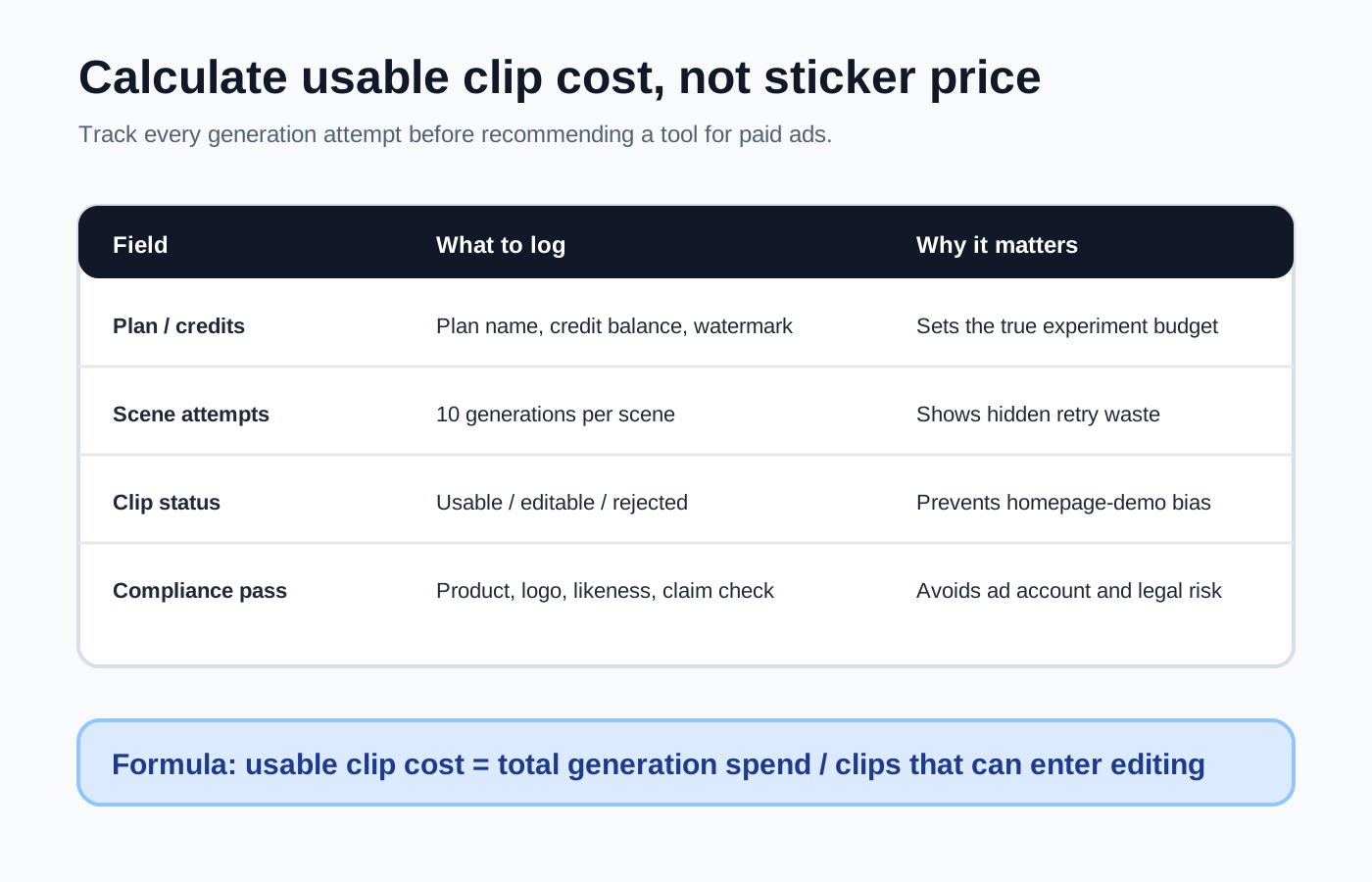
Use this metric: usable clip cost = total generation spend / clips that can enter editing. A cheap model is not cheap if nine out of ten generations are unusable.
Reusable ecommerce prompt
Use this as a starting point, then adapt it for each tool’s prompt style.
Create a 6-second vertical ecommerce ad video from this product image.
Keep the product centered with soft studio lighting and a clean background.
Camera movement: slow push-in for 2 seconds, subtle product rotation for 2 seconds, final hero lock-up for 2 seconds.
Preserve the product shape, color, logo placement, and packaging structure. Do not generate text or extra accessories. Suitable for TikTok/Reels feed ads.
Chinese-localized version for teams testing Kling or Chinese ad placements:
请基于这张商品图生成一段 6 秒 9:16 电商广告视频。
画面:产品位于画面中央,柔和棚拍光,背景干净,有轻微景深。
镜头:前 2 秒缓慢推进,中间 2 秒产品轻微旋转,最后 2 秒定格在产品正面。
要求:保持产品形状、颜色、Logo 和包装结构一致;不要生成任何文字;不要添加额外配件;画面适合 TikTok/抖音信息流广告。
Recommended workflows by team type
Solo seller or small ecommerce team
Start with Kling, then add Runway if you need more control. Your biggest need is not cinema-grade output; it is affordable testing. A practical workflow is: clean product image -> generate 10 hook variants -> add captions and price in CapCut/Canva -> run small-budget tests.
Brand ecommerce or agency team
Use Runway as the main creative workspace, Kling for exploration, and Veo for realism tests. Build a simple SOP around reference images, shot lists, approval notes, and retry logs.
Platform or growth team with developers
Evaluate Veo API and Runway API first, then test Kling based on region, pricing, and workflow constraints. Your core problem is queueing, logging, retry control, asset storage, and permission management, not just whether the web UI is fun.
Pre-publish checklist
- Does the product image come from your own brand or a licensed source?
- Does any human scene create likeness or misleading product-fit risk?
- Are logos, packaging, and product functions accurate?
- Are discounts and promo claims added in post-production, not hallucinated by the model?
- Are tool name, model version, prompt, generation date, and cost logged for each ad?
- Is every Sora mention framed as archive/risk context rather than a new workflow recommendation?
Sources
| Source | Used for | Freshness |
|---|---|---|
| https://help.openai.com/en/articles/20001152-what-to-know-about-the-sora-discontinuation | Sora web/app discontinuation status and API shutdown note. | Checked 2026-05-02 |
| https://openai.com/index/sora-2/ | Sora 2 original positioning, physics/control/audio framing, rollout context. | Checked 2026-05-02 |
| https://runwayml.com/research/introducing-runway-gen-4 | Runway Gen-4 consistency positioning for characters, locations, and objects. | Checked 2026-05-02 |
| https://help.runwayml.com/hc/en-us/articles/40042718905875-Gen-4-Image-References-Guide | Reference-image workflow and consistency best practices. | Checked 2026-05-02 |
| https://klingai.com/ | Kling text-to-video, image-to-video, effects, and virtual try-on product surfaces. | Checked 2026-05-02 |
| https://ai.google.dev/gemini-api/docs/video | Veo text-to-video and image-to-video API workflow. | Checked 2026-05-02 |
Quality note
This article is a reproducible evaluation guide, not a fabricated benchmark. If POPMARS later runs controlled tests, add actual usable-rate, retry-count, cost, and screenshot evidence. AI video pricing, plan limits, region availability, and model names change quickly, so the tool status and pricing checks should be refreshed monthly.
Newsletter
Get practical AI workflows in your inbox.
A weekly digest of AI tools, workflow breakdowns, and reusable templates from POPMARS.