AI Tutorials
ComfyUI Virtual Try-On Workflow Comparison for Apparel Ecommerce
A practical comparison of ComfyUI virtual try-on routes for apparel teams: Kling, CatVTON, IDM-VTON, and OOTDiffusion.
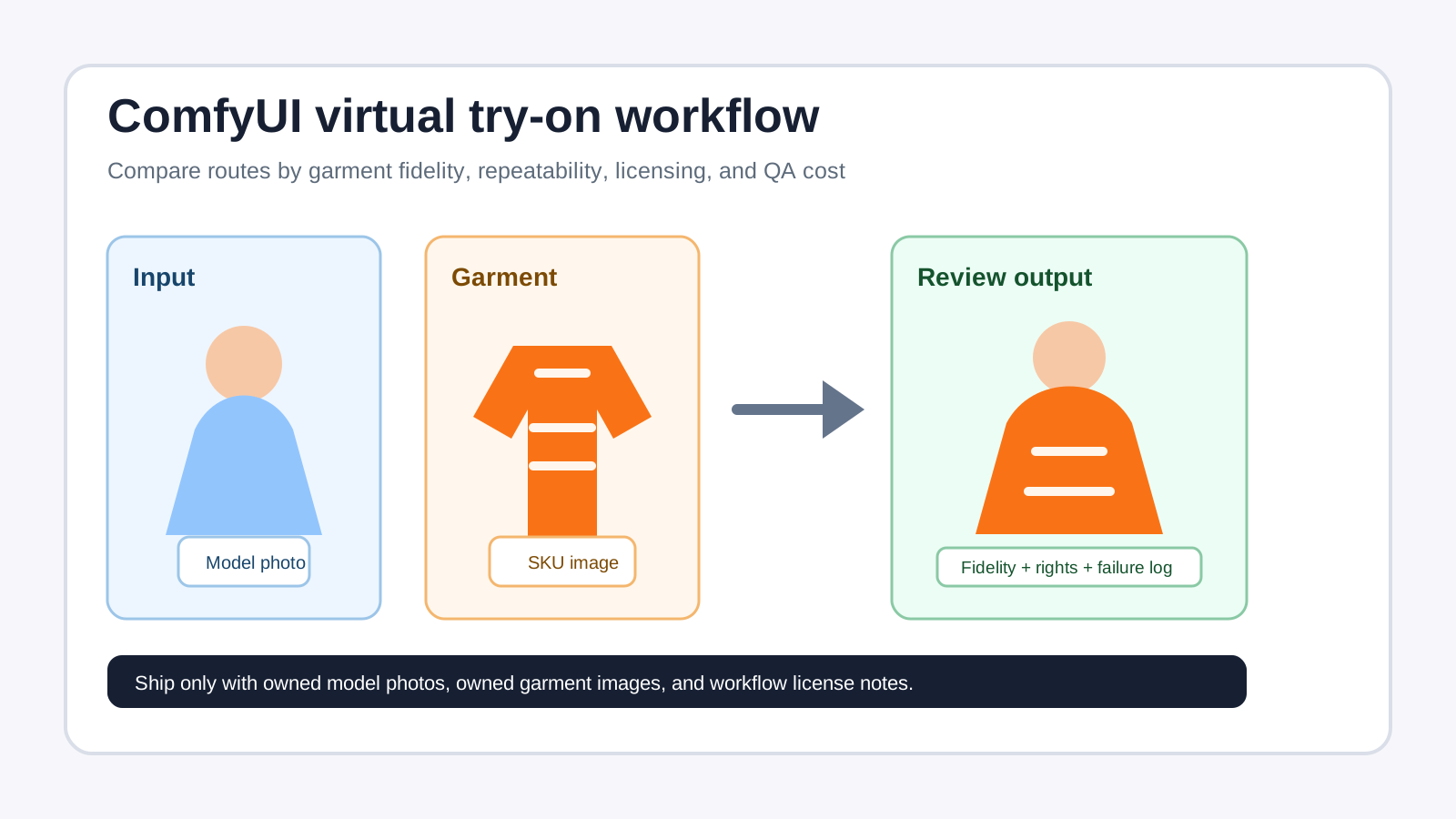
A good ComfyUI virtual try-on workflow is not the one that makes the flashiest demo image. For apparel ecommerce, the real question is whether a team can feed in a model photo and a garment image, reproduce the result, catch failures, and stay inside commercial-use rights. As of May 2, 2026, ComfyUI is strong enough for prototyping and controlled content pipelines, but the safest production path depends on licensing, QA, and repeatability.
Short answer: start commercial proof-of-concept work with ComfyUI + Kling Virtual Try On partner node or another properly licensed API route. Treat CatVTON, IDM-VTON, and OOTDiffusion as research baselines or internal demos unless you obtain separate commercial permission, because their public repositories point to CC BY-NC-SA 4.0 terms.
What production-ready means for apparel try-on
For ecommerce, virtual try-on quality is not just “does it look realistic?” The output must preserve product information and survive review at SKU scale.
| Criterion | Why it matters | Minimum bar |
|---|---|---|
| Garment fidelity | The product page cannot invent a new collar, print, or button layout | Main silhouette and visible details stay recognizable |
| Body and pose integrity | Shoulders, sleeves, waistlines, and hands fail often | Anatomy remains plausible without misleading fit |
| Occlusion handling | Hair, hands, bags, and layered outfits confuse models | Masks or repair passes can isolate problem zones |
| Batch repeatability | Ecommerce teams need hundreds of consistent outputs | JSON workflows, named inputs, and tracked seeds |
| Rights and licenses | Tools, weights, model photos, and garment photos all carry rights | Legal review before any marketing use |
| China availability | GitHub, Hugging Face, and cloud APIs may require network planning | Local cache, mirror, or proxy plan documented |
ComfyUI fits this problem because it represents a workflow as a node graph. The official docs describe workflows as connected nodes and explain that workflows can be saved as JSON files for versioning and sharing. That makes it easier to audit an apparel pipeline: input human image, input garment image, mask, try-on model, upscale, and QA export.
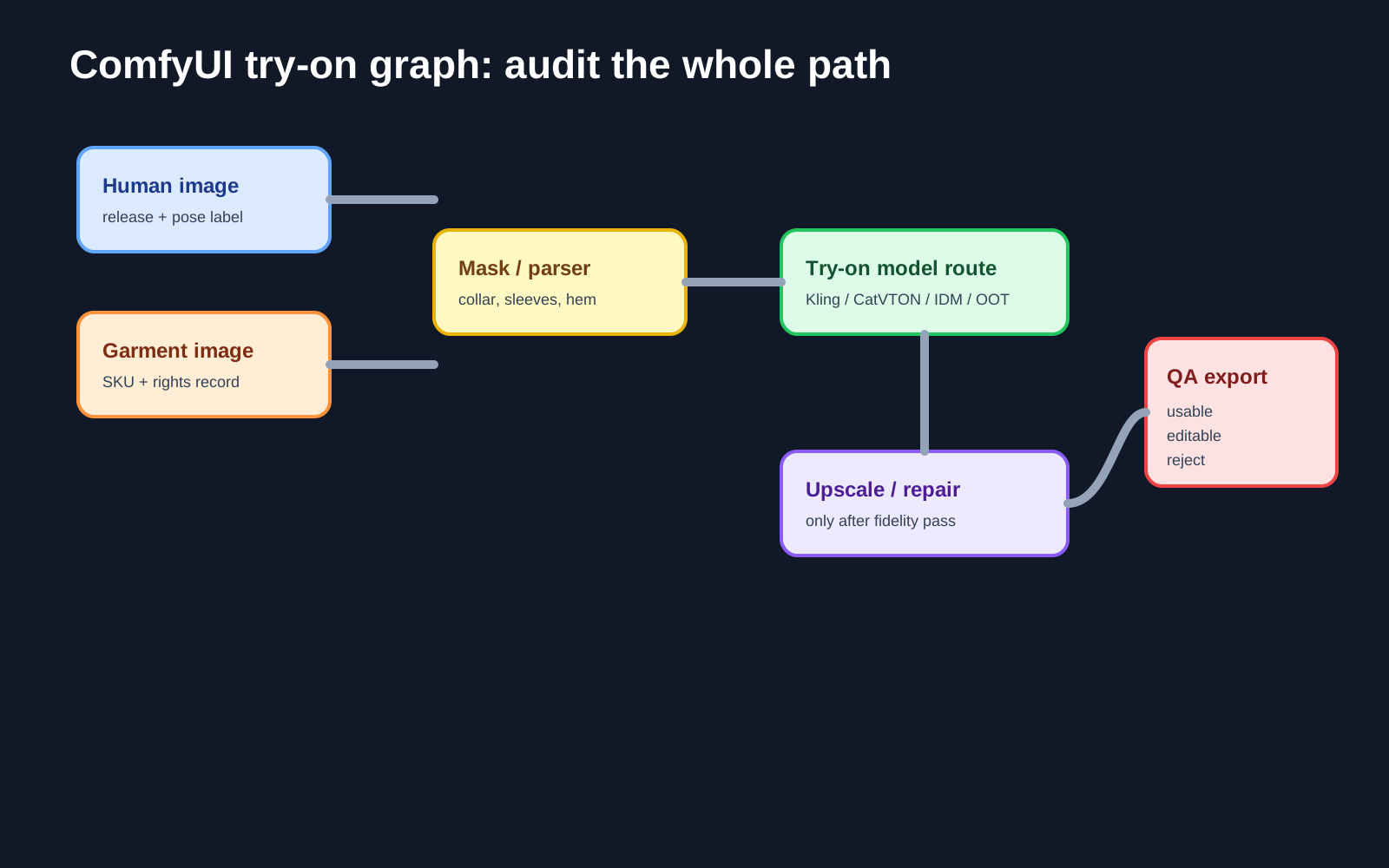
Quick comparison: four ComfyUI virtual try-on routes
| Route | Best for | Strengths | Main risk | Commercial guidance |
|---|---|---|---|---|
| Kling Virtual Try On partner node | Fast production proof of concept | Built-in node, fewer local dependencies, documented pricing | Cloud terms, cost, and account availability | Promising for PoC; verify Kling/Comfy terms before launch |
| CatVTON ComfyUI workflow | Local technical baseline | Official README provides ComfyUI zip and workflow JSON | Public repo uses CC BY-NC-SA 4.0 | Use for research and benchmarking, not direct commercial output |
| IDM-VTON | Real-world and complex-pose evaluation | Designed around authentic virtual try-on “in the wild” | Public code/checkpoints use CC BY-NC-SA 4.0 | Good research baseline; commercial use needs separate permission |
| OOTDiffusion / ComfyUI-OOTDiffusion | Custom-node ecosystem testing | Community ComfyUI node and example workflow | Same non-commercial license family | Useful for demos and failure taxonomy, not production marketing |
The key rule: running inside ComfyUI does not automatically make a workflow commercially usable. ComfyUI itself is GPL-3.0 licensed, but each model, checkpoint, custom node, input asset, and API service can have separate terms.
Route 1: Kling Virtual Try On for commercial PoC
ComfyUI’s built-in node documentation lists KlingVirtualTryOnNode with inputs such as human_image, cloth_image, and model_name; the default model shown is kolors-virtual-try-on-v1. The partner-node pricing page lists Kling Virtual Try On for kolors-virtual-try-on-v1 and kolors-virtual-try-on-v1-5 at 14.77 credits/run, and the same page states that 211 credits equals 1 USD. That is roughly USD $0.07 per generation before retries, upscaling, storage, and human QA.
This route is the most practical first test when the goal is “produce 50-200 reviewable samples this week.” ComfyUI’s partner-node overview says partner nodes are optional, designed to give access to closed-source models, reduce API-key handling, and control spend through a prepaid system.
Before publishing any output, still verify: whether the service terms allow product marketing images; whether AI-generated try-on images need disclosure; whether your model photos have releases; and whether the service is stable for the target market.
Route 2: CatVTON for a lightweight local baseline
CatVTON’s official README provides a ComfyUI deployment path: download ComfyUI-CatVTON.zip, place it under custom_nodes, then drag in catvton_workflow.json. The README also describes the model as lightweight, with about 899M parameters and a stated target of running 1024x768 inference under 8GB VRAM.
For ecommerce teams, CatVTON is useful as a controlled local baseline. You can run the same model photos and garment images through a frozen JSON workflow, then compare garment fidelity, pose stability, and failure types against API-based outputs.
The licensing caveat is decisive: CatVTON’s repository badge and license file point to CC BY-NC-SA 4.0. Treat it as a research and evaluation tool unless you receive explicit commercial permission.
Route 3: IDM-VTON for complex real-world tests
IDM-VTON is the official implementation of “Improving Diffusion Models for Authentic Virtual Try-on in the Wild,” and its README references components such as DensePose, human parsing, and OpenPose. That makes it worth including when your test set contains less controlled photos: side poses, seated models, crossed arms, long hair, layered clothes, or strong fabric patterns.
Use IDM-VTON to answer questions such as:
- Does the workflow preserve a printed logo or stripe pattern?
- Does it avoid swallowing fingers at sleeve cuffs?
- Can it keep face, hair, skin tone, and background stable?
- Does it support separate evaluation for tops, outerwear, and bottoms?
But do not skip the license check. The IDM-VTON README says the code and checkpoints are under CC BY-NC-SA 4.0. That makes it a research baseline, not a default commercial workflow.
Route 4: OOTDiffusion for ecosystem and failure-mode testing
OOTDiffusion provides an official implementation, Hugging Face checkpoint links, and a demo route. The community project ComfyUI-OOTDiffusion wraps it as a ComfyUI custom node and includes an example workflow.json.
This route is especially useful for documenting operational friction: installing custom nodes, handling model downloads, loading example workflows, and collecting failure screenshots. It is a good way to teach a team what can go wrong before they attempt a paid or commercial pipeline.
The same commercial warning applies. Both OOTDiffusion and ComfyUI-OOTDiffusion expose CC BY-NC-SA 4.0 license files. Use them for education, demos, and research unless commercial rights are cleared.
A reproducible test plan for apparel teams
Do not pick the best-looking one-off sample. Build a small evaluation set first:
- Human images: front-facing, side pose, seated pose, crossed arms, long hair; 3-5 examples per group; all with model releases.
- Garment images: flat-lay white background, garment-on-model, and detail crops; record SKU, material, color, logo, and print.
- Output sizes: start with 768x1024 or 1024x1024 to avoid judging models under inconsistent resizing.
- ComfyUI JSON files: save a separate workflow for each route, including model name, date, and input spec.
- QA scorecard: rate collar, sleeve cuffs, hem, logo, body proportion, background pollution, and occlusion handling.
Example folder structure:
/comfyui-vton-test/
  inputs/human/pose_front_001.jpg
  inputs/garment/top_sku_202605_001.png
  workflows/kling_vton_v1_5_2026-05-02.json
  outputs/kling_vton_v1_5/front_001_sku_001_seed42.png
  qa/virtual_try_on_scorecard_2026-05-02.csv
If POPMARS later offers a downloadable workflow pack, bundle only JSON files, setup notes, placeholder inputs, and QA templates. Do not redistribute third-party checkpoints or unlicensed model/garment photos.
Failure taxonomy: what reviewers must catch
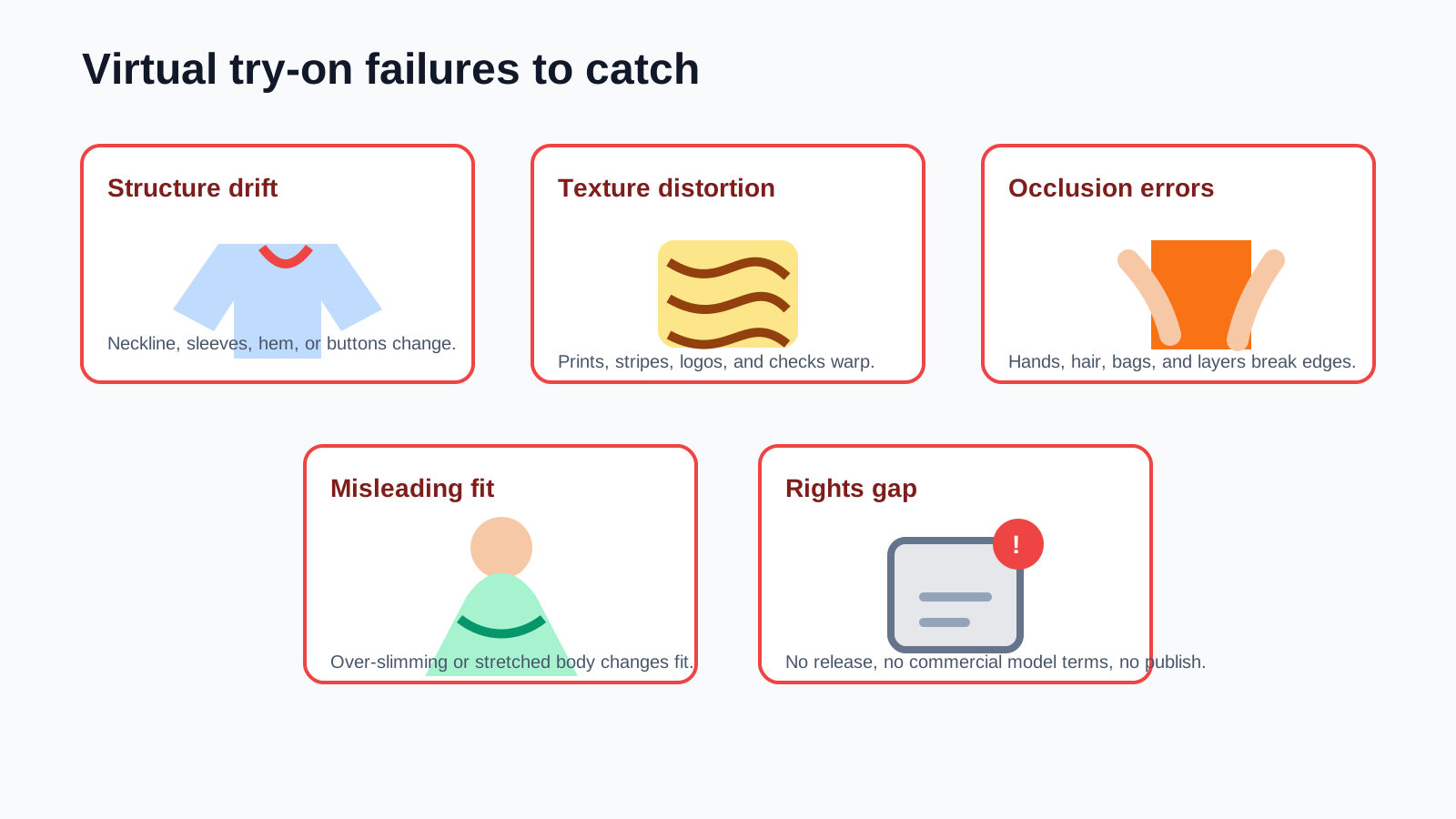
The most dangerous virtual try-on output is not an obviously bad image. It is a realistic image that quietly changes product information.
- Structure drift: V-neck becomes crew neck, long sleeve becomes short sleeve, waistband moves.
- Texture distortion: stripes, checks, logos, and prints warp over the body.
- Occlusion errors: fingers disappear into sleeves, hair covers the collar incorrectly, bag straps vanish.
- Misleading fit: over-slimming or body elongation makes the garment look better than it is.
- Background contamination: garment color leaks into skin, walls, or shadows.
- Compliance risk: model photo lacks a release, or a non-commercial model is used for an ad image.
For live ecommerce pages, label outputs as AI try-on references where appropriate and keep access to original product photos. Final disclosure requirements depend on platform rules and local advertising law.
Recommendation by stage
- Need a content PoC this week: test Kling Virtual Try On inside ComfyUI and log cost, retries, and failure rate.
- Need a local benchmark: run CatVTON against the same evaluation set and track VRAM, speed, and garment fidelity.
- Need complex real-world research: include IDM-VTON, but keep it outside commercial output unless rights are cleared.
- Need an educational ComfyUI tutorial: use OOTDiffusion/ComfyUI-OOTDiffusion to explain custom nodes, workflow JSON, and failure modes.
The best workflow is not the model with the loudest demo. It is the one your apparel team can license, reproduce, inspect, and improve without misleading shoppers.
Sources
| Source | What was used | Freshness |
|---|---|---|
| https://docs.comfy.org/development/core-concepts/workflow | Definition of ComfyUI workflows as node graphs and JSON-shareable files. | Checked 2026-05-02 |
| https://docs.comfy.org/specs/workflow_json | Workflow JSON schema and metadata direction. | Checked 2026-05-02 |
| https://github.com/Comfy-Org/ComfyUI/blob/master/LICENSE | ComfyUI GPL-3.0 license confirmation. | Checked 2026-05-02 |
| https://docs.comfy.org/built-in-nodes/KlingVirtualTryOnNode | Kling Virtual Try On inputs and default model information. | Checked 2026-05-02 |
| https://docs.comfy.org/tutorials/partner-nodes/overview | Partner-node benefits, optional nature, and prepaid-control positioning. | Checked 2026-05-02 |
| https://docs.comfy.org/tutorials/partner-nodes/pricing | Kling Virtual Try On credits/run and credits/USD conversion. | Checked 2026-05-02 |
| https://github.com/Zheng-Chong/CatVTON | CatVTON ComfyUI workflow, deployment direction, parameter/VRAM claims. | Checked 2026-05-02 |
| https://github.com/Zheng-Chong/CatVTON/blob/main/LICENSE | CatVTON CC BY-NC-SA 4.0 licensing risk. | Checked 2026-05-02 |
| https://github.com/yisol/IDM-VTON | IDM-VTON official implementation, dependency context, real-world positioning. | Checked 2026-05-02 |
| https://github.com/yisol/IDM-VTON/blob/main/LICENSE | IDM-VTON CC BY-NC-SA 4.0 licensing risk. | Checked 2026-05-02 |
| https://github.com/levihsu/OOTDiffusion | OOTDiffusion official implementation, checkpoint/demo context. | Checked 2026-05-02 |
| https://github.com/levihsu/OOTDiffusion/blob/main/LICENSE | OOTDiffusion CC BY-NC-SA 4.0 licensing risk. | Checked 2026-05-02 |
| https://github.com/AuroBit/ComfyUI-OOTDiffusion | ComfyUI-OOTDiffusion custom node and example workflow. | Checked 2026-05-02 |
| https://github.com/AuroBit/ComfyUI-OOTDiffusion/blob/main/LICENSE | ComfyUI-OOTDiffusion CC BY-NC-SA 4.0 licensing risk. | Checked 2026-05-02 |
Quality note
This article does not claim that POPMARS has completed benchmark testing. Output quality, latency, failure rate, and commercial terms should be refreshed monthly. The diagrams are POPMARS-created SVGs and do not use third-party model photos, garment photos, paper figures, or unlicensed generated outputs.
Newsletter
Get practical AI workflows in your inbox.
A weekly digest of AI tools, workflow breakdowns, and reusable templates from POPMARS.