AI Coding Tutorials
Cursor Ecommerce Product Page Workflow: From Brief to Launch-Ready Page
A practical Cursor workflow for ecommerce product pages: repo map, prompts, SEO metadata, structured data, and launch QA.
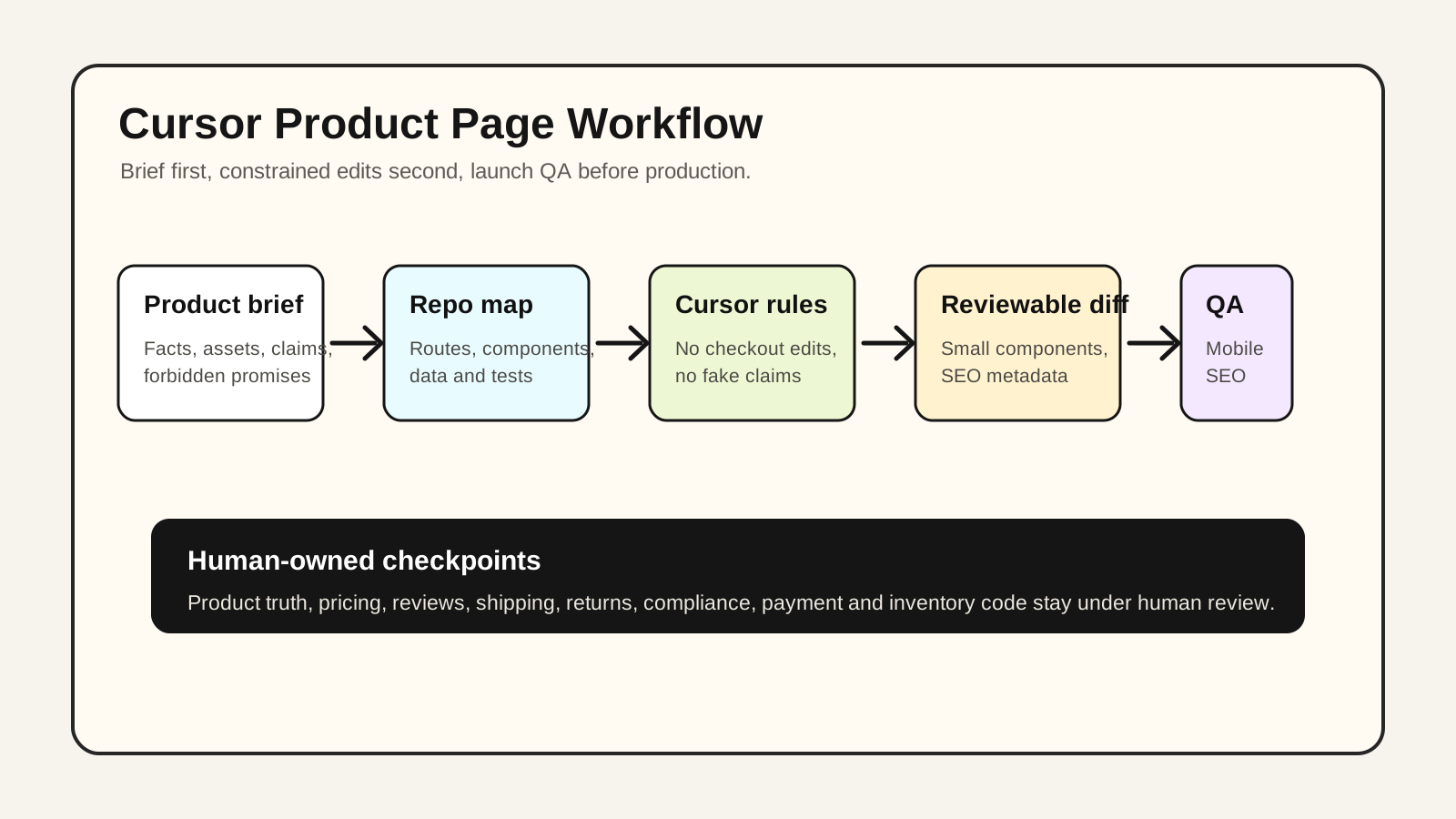
The best Cursor ecommerce product page workflow is not “ask AI to build a page.” It is a controlled loop: give Cursor a product brief, map the repo, constrain the files it can touch, review the diff, then run SEO and launch QA before anything ships. This guide is written for indie ecommerce teams using Next.js, Shopify Hydrogen, Remix, or a custom React storefront.
This is a reproducible workflow article, not a claimed client case study. POPMARS is not inventing conversion lifts, order volume, or customer results; the product examples below are demonstration briefs.
Quick answer: when should you use Cursor for product pages?
| Use case | Fit | Let Cursor do | Keep human-owned |
|---|---|---|---|
| Single-product landing page | High | Sections, components, FAQ draft, SEO metadata | Claims, pricing, reviews, guarantees |
| Multi-SKU page template | High | Reusable template, field mapping, structured data draft | Variant logic, inventory, checkout behavior |
| Shopify Hydrogen or React storefront edits | Medium-high | Component changes, page blocks, QA checklist | API contracts, taxes, payment, theme compatibility |
| Visual campaign page | Medium | Hero layout, CTA variants, responsive styling | Brand direction, creative approvals, legal claims |
| Custom checkout or payment flow | Low | Non-payment content only | Payment, fraud, tax, compliance |
Recommendation: use Cursor as an engineering copilot for repeatable page work, not as a merchandising or compliance authority.
The workflow: repo map first, code changes second
Cursor’s Agent documentation describes Agent as an assistant that can handle complex coding tasks, run terminal commands, and edit code. Cursor’s Rules documentation also supports project rules stored in .cursor/rules, version-controlled and scoped to the codebase. For ecommerce work, those two features are most useful when you add constraints before asking for code.
A reliable product page workflow has six steps:
- Collect product facts: SKU, price, audience, benefits, shipping, returns, warranty, image source.
- Create a repo map: routes, components, CMS schema, styling system, metadata pattern, tests.
- Add Cursor rules: no checkout changes, no fake claims, use existing component patterns.
- Prompt in phases: plan first, page structure second, SEO third, QA last.
- Review diffs: reject large unclear changes and anything touching payment or inventory unexpectedly.
- Run QA: mobile layout, CTA route, metadata, structured data, accessibility, performance.
Step 1: write a product brief Cursor can actually use
Do not start with “build a product page.” Start with a brief. A simple product-page-brief.md is enough:
# Product Page Brief

Product: X1 portable coffee grinder
Audience: campers and office pour-over coffee drinkers
Primary keyword: portable coffee grinder
Page goal: explain quiet operation, battery life, and grind consistency to improve add-to-cart intent
Do not invent: sales volume, reviews, certifications, awards, third-party test results
Assets: /public/products/x1/*.webp, approved for publication
Required sections: hero, pain points, specs table, comparison table, FAQ, review placeholder, guarantee block
Stack: Next.js App Router + Tailwind + MDX content
This reduces hallucination because it tells Cursor which facts are available and which facts must remain blank. Anything about reviews, certifications, medical or safety effects, sustainability claims, or “best-selling” status should come from a verified source, not from a model.
Step 2: add .cursor/rules for ecommerce guardrails
For a storefront, the rule file matters more than a clever prompt. Create a focused product page rule:
# Ecommerce Product Page Rules

- Do not change checkout, payment, tax, inventory, or auth code unless explicitly asked.
- Product claims must come from `product-page-brief.md`; if missing, add TODO instead of inventing.
- Every product page needs: H1, price/offer area, primary CTA, FAQ, specs, shipping/returns copy.
- Add SEO metadata via the existing project pattern.
- If the project uses JSON-LD, draft Product schema but mark missing fields as TODO.
- Keep components small: Hero, Benefits, SpecsTable, Comparison, FAQ, StickyCTA.
- After coding, list changed files and QA steps.
If your team works in multiple languages, keep engineering rules in English and localize the customer-facing copy separately. That usually makes model behavior more predictable while preserving localized storefront copy.
Step 3: ask for a file-level plan before any edits
Cursor should inspect before it edits. Start with a planning prompt:
You are working on an ecommerce product page.
Read `product-page-brief.md`, inspect the routing/component structure, and propose a file-level plan.
Do not edit files yet.
Return:
1. Existing route and component map
2. Files you need to change or create
3. SEO metadata approach
4. Product schema / JSON-LD approach
5. Risks or missing product facts
After you approve the plan, run a narrow implementation prompt:
Implement phase 1 only: create the product page structure and reusable components.
Do not touch checkout, cart, payment, auth, or inventory code.
Use TODO comments where product facts are missing.
After editing, summarize changed files and include a manual QA checklist.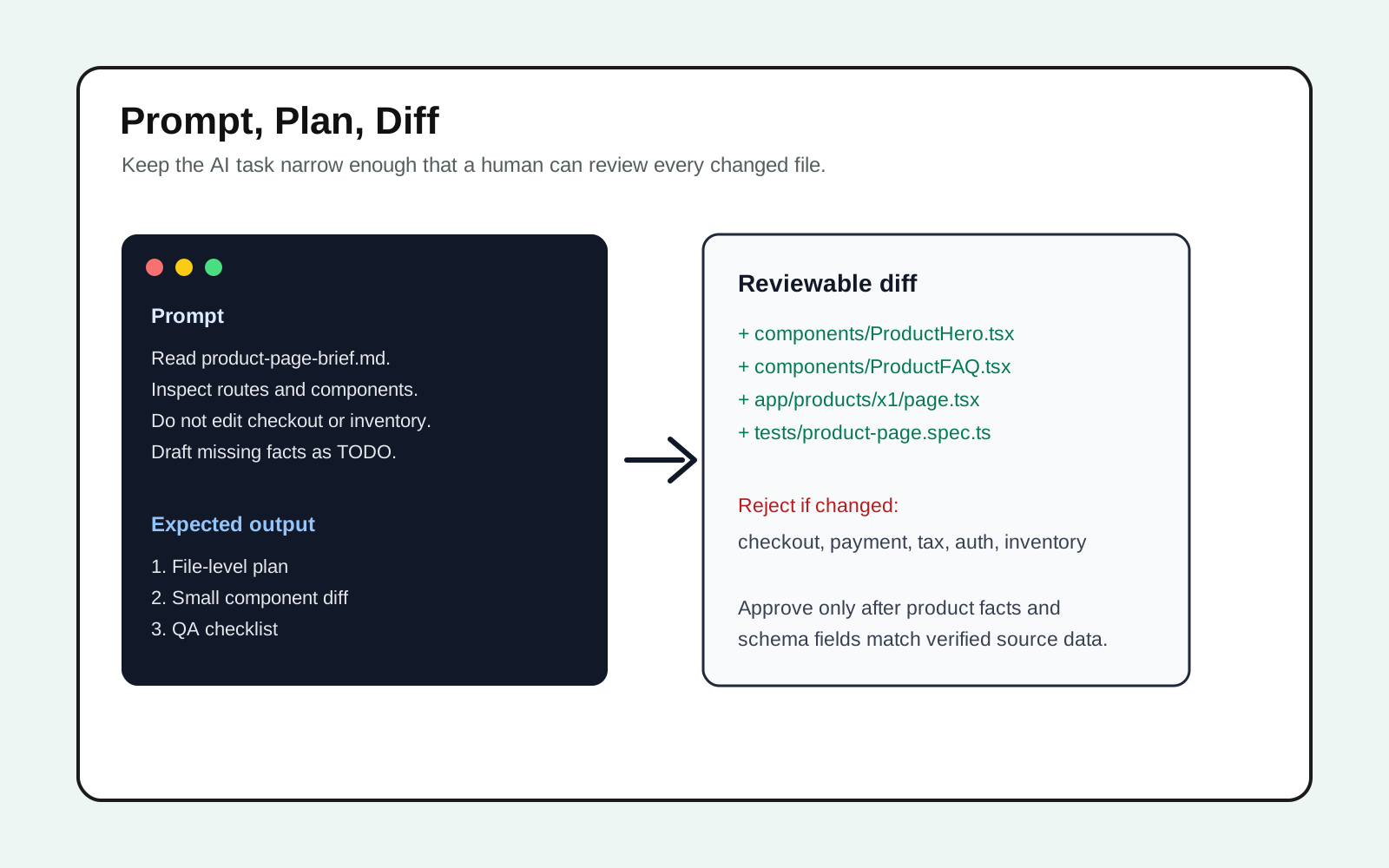
Step 4: turn ecommerce SEO into a coding task
Google Search Central separates product structured data into Product snippets and Merchant listings. Product snippets fit pages where users cannot directly buy; Merchant listings are for pages where customers can purchase and require more complete product information such as price, shipping, and returns. Most ecommerce product pages should be prepared with merchant listing requirements in mind, but missing fields should be marked as TODO rather than fabricated.
For a Next.js storefront, the official Metadata API supports a static metadata object and a dynamic generateMetadata function, and Next.js generates the relevant <head> tags. A good Cursor task is specific:
Add SEO metadata for this product page following the existing Next.js App Router pattern.
Use primary keyword in title, description, H1, and first paragraph.
Draft JSON-LD Product structured data only from fields present in `product-page-brief.md`.
For missing fields such as review, aggregateRating, shippingDetails, or returnPolicy, add TODOs instead of fake values.| SEO item | Do | Do not |
|---|---|---|
| Title | Product name + strongest benefit + category term | Stuff five keywords |
| H1 | One clear H1 that matches search intent | Use H1 for every section |
| Meta description | Clear promise and product category | Promise unverified results |
| FAQ | Shipping, returns, material, sizing/specs | Invent customer questions from fake reviews |
| JSON-LD | Real price, availability, brand, image, offer fields | Fake ratings, fake stock, fake review counts |
Step 5: use Cursor for QA scaffolding, then verify manually
Cursor can draft QA steps and tests, but it cannot decide whether a page is commercially truthful. Playwright is a good fit for basic page regression because it is an end-to-end testing framework with multi-browser support.
Ask Cursor for small, durable checks:
Create or update product page QA checks.
Focus on:
- page renders on desktop and mobile viewport
- primary CTA is visible and points to the expected cart/buy route
- product images have alt text
- FAQ accordion can open
- no console errors on page load
Do not create brittle visual snapshot tests unless the project already uses them.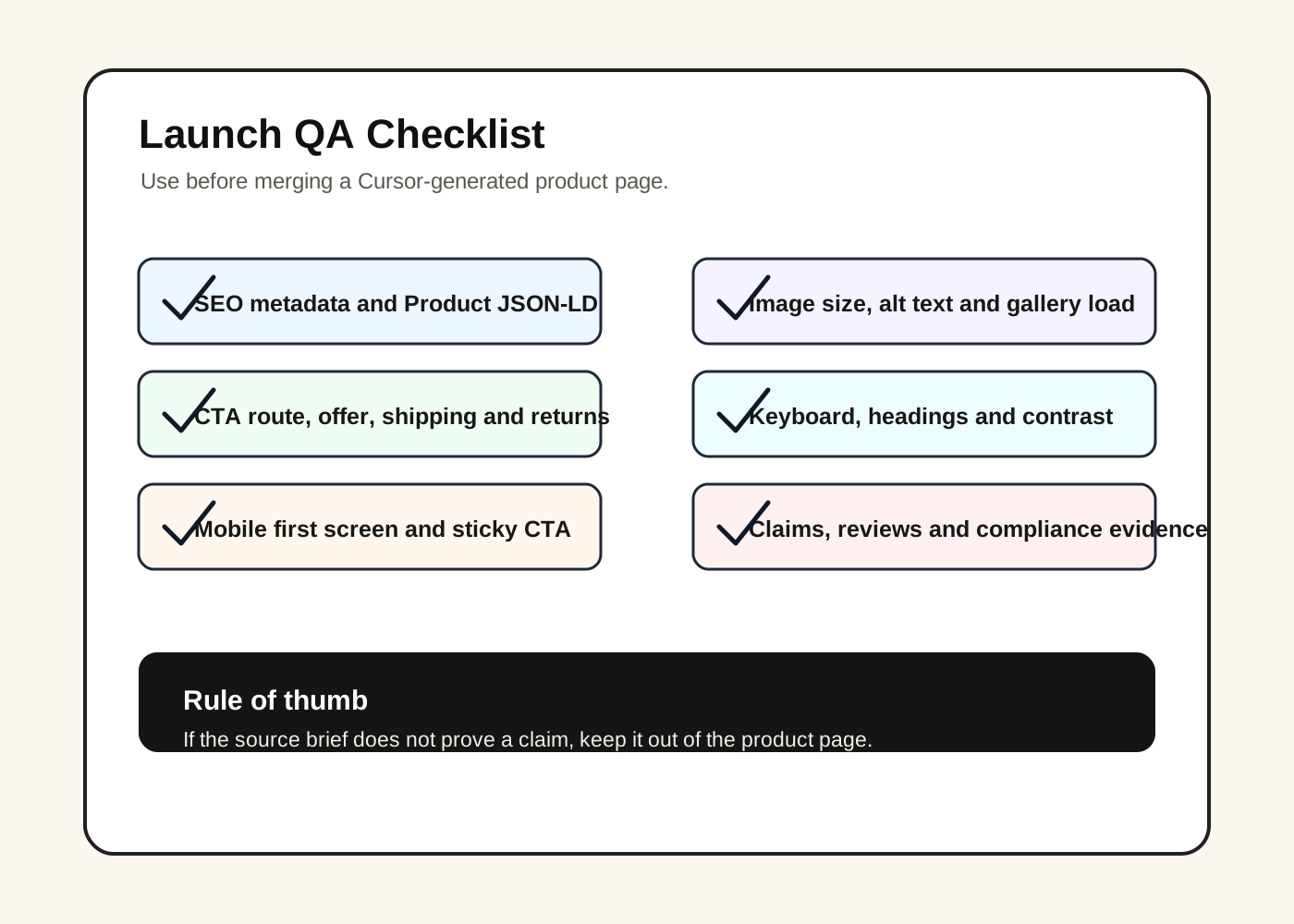
Manual launch checklist:
- Conversion: does the first screen explain what it is, who it is for, and why someone should buy?
- Trust: are shipping, returns, warranty, payment safety, and support expectations visible?
- Mobile: is the CTA easy to reach, and do specs and comparison tables behave on small screens?
- SEO: do title, description, H1, FAQ, Open Graph, and Product schema match real product data?
- Performance: are hero and gallery images compressed and correctly sized?
- Compliance: are reviews, ratings, certifications, eco or health claims, and guarantees backed by evidence?
Copy-paste Cursor prompt pack
Prompt 1: repo map
Inspect this ecommerce codebase and create a concise repo map for product pages.
Identify routes, product data sources, UI components, SEO metadata patterns, tests, and styling conventions.
Do not edit files.
Prompt 2: product page plan
Using `product-page-brief.md`, propose a product page implementation plan.
Separate the work into: page structure, content sections, SEO metadata, JSON-LD, responsive styling, QA.
List risks and missing product facts. Do not edit files yet.
Prompt 3: first implementation pass
Implement the approved plan for the product page.
Respect `.cursor/rules/ecommerce-product-page.md`.
Only change files related to this product page and shared UI components when necessary.
Use TODO placeholders for missing facts. Summarize changed files and QA steps.
Prompt 4: SEO and structured data review
Review the product page for SEO and structured data accuracy.
Check title, meta description, H1, image alt text, FAQ, canonical, Open Graph, and JSON-LD Product fields.
Flag any claim that is not backed by `product-page-brief.md`.
Common mistakes to avoid
- Letting AI invent merchandising claims: remove “best-selling,” “loved by thousands,” or “clinically proven” unless sourced.
- Allowing checkout changes: a product page task should not quietly edit payment, tax, auth, or inventory code.
- Faking structured data: incomplete Product schema is safer than fabricated ratings or stock status.
- Skipping mobile: paid social and shopping traffic often land on mobile first.
- Accepting giant diffs: if you cannot review it, do not ship it.
Recommended team split
| Role | Owns | Does not own |
|---|---|---|
| Operator / merchant | Product facts, claims, pricing, asset rights, offer strategy | Letting AI create business promises |
| Brand / design | Hero direction, visual hierarchy, image selection | Checkout or inventory logic |
| Engineer | Code review, data integration, tests, deployment, rollback | Inventing product claims |
| Cursor Agent | Component draft, metadata, FAQ placeholders, QA checklist | Final truth, legal approval, commercial strategy |
Final takeaway
A launch-ready product page is still built on product truth, customer insight, and trust. Cursor helps by turning those inputs into components, metadata, structured data drafts, and QA steps faster. Keep the loop disciplined: plan first, diff second, QA third.
For the baseline Cursor workflow, read POPMARS’ published Cursor 2026 tutorial next.
Sources
| URL | How it informed the article | Freshness |
|---|---|---|
| https://cursor.com/docs/agent/overview | Verified Cursor Agent positioning around complex coding tasks, terminal commands, and code editing. | Checked 2026-05-02 |
| https://cursor.com/docs/rules | Verified .cursor/rules project rules, versioning, and codebase scope. | Checked 2026-05-02 |
| https://cursor.com/pricing | Confirmed the public pricing page is available; this article avoids exact prices to reduce freshness risk. | Checked 2026-05-02 |
| https://developers.google.com/search/docs/appearance/structured-data/product | Verified Product snippets, Merchant listings, and product structured-data risks. | Checked 2026-05-02 |
| https://nextjs.org/docs/app/getting-started/metadata-and-og-images | Verified Next.js Metadata API and OG image documentation. | Checked 2026-05-02 |
| https://playwright.dev/docs/intro | Verified Playwright end-to-end testing and multi-browser context. | Checked 2026-05-02 |
Quality note
This article does not claim a real merchant test, conversion lift, or client case study. Cursor pricing, model limits, Agent/Rules UI, regional access, and Google product structured-data requirements can change; refresh them regularly. Diagrams are POPMARS-created SVGs and do not use real customer code, Cursor UI screenshots, or third-party brand assets.
Newsletter
Get practical AI workflows in your inbox.
A weekly digest of AI tools, workflow breakdowns, and reusable templates from POPMARS.